Introduction to the TI-84 Calculator
The TI-84 calculator is a powerful graphing calculator used by students, teachers, and professionals. Made by Texas Instruments, it helps solve math problems in algebra, calculus, and statistics. You can also use a TI-84 calculator online, which works like the real device without downloads. Whether for homework, practice, or exams, the TI-84 graphing calculator is a reliable tool that makes learning math easier.
TI-84 Calculator Models Explained

The TI-84 calculator comes in different models, mainly the TI-84 Plus and TI-84 Plus CE. Both help with algebra, calculus, and statistics, but differ in speed, display, and design. Choosing the right model or deciding on a TI-84 calculator online depends on your needs.
TI-84 Plus
Features a monochrome screen and physical buttons. It’s reliable for exams and everyday calculations.
TI-84 Plus CE
Has a full-color display, faster performance, and a slim design. Perfect for a modern, smooth user experience.
Understanding the TI-84 Calculator Interface
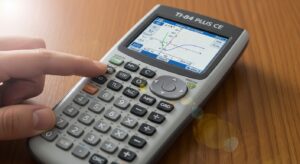
Knowing the TI-84 calculator interface makes using it much easier. The layout is similar whether you use a physical device or a TI-84 calculator online.
Screen Layout
Displays graphs, tables, and results clearly. Switch between views using menu options.
Important Keys
Keys like Y=, WINDOW, GRAPH, and STAT help you enter functions, adjust graphs, and analyze data.
Menu System
Menus organize features for algebra, calculus, and statistics, making navigation simple.
How to Use a TI-84 Calculator

Using a TI-84 calculator is simple once you understand the main steps. Whether you’re using a physical TI-84 graphing calculator or a TI-84 calculator online, following these steps helps you solve equations, graph functions, and work with data efficiently. Learning step-by-step makes it easier to avoid mistakes and use all the features the calculator offers.
Basic Setup
Before starting, check that the calculator is in the correct mode. For example, choose degree or radian depending on the type of math problem. If previous calculations or settings are causing errors, perform a reset. This ensures that the calculator works properly and that all functions display accurate results. Always check the MODE menu first—it controls the way graphs, angles, and functions behave.
Entering Math Expressions
When entering equations or functions, use correct symbols and parentheses carefully. For instance, always type (3+2)*4 instead of 3+2*4 to get the right answer. The TI-84 respects order of operations, so parentheses are essential for accurate results. Practice typing expressions to avoid syntax errors, which are one of the most common beginner mistakes.
Graphing Functions
To graph a function, press Y= and type your equation (for example, y=x^2+3). Then adjust the WINDOW settings if necessary to see the graph properly. Finally, press GRAPH to display the function. You can analyze its shape, intersections, or maximum and minimum points. Graphing is one of the TI-84’s most powerful features for visualizing math.
Solving Equations
The TI-84 can solve equations in two ways. You can use the equation solver found in the MATH menu to input an equation directly. Alternatively, graph the function and find where it intersects the x-axis or another function using the CALC → intersect feature. Both methods allow you to find solutions accurately and quickly, making problem-solving much easier.
Using Tables
The TABLE feature shows function values for different x-values. Press 2ND → GRAPH to view the table. This is useful for checking patterns, verifying answers, or comparing multiple functions. You can scroll through x-values step by step to see how y-values change, which helps in algebra, calculus, and statistics problems. Tables give a clear, step-by-step understanding of function behavior.
Using the TI-84 Calculator for Math Subjects
The TI-84 calculator is helpful for different subjects. Using it regularly improves accuracy and confidence.

Algebra Examples
Solve linear and quadratic equations, factor expressions, and graph functions.
Calculus Examples
Find derivatives, integrals, and analyze function behavior.
Statistics Examples
Perform regression, calculate mean and standard deviation, and interpret data.
Real-World Practice Examples Using a TI-84 Calculator
Practice with the TI-84 calculator helps students understand math better. Real-world examples make learning fun.
Solve a Quadratic Equation
Use Y= or the equation solver to find roots quickly.
Graph a Function
Input the function, adjust the window, and press GRAPH.
Run Regression Analysis
Use STAT functions to analyze data and predict trends.
TI-84 Calculator Tips for Students
Knowing tips can save time and reduce mistakes. These tips help in algebra, calculus, and statistics.
Study Efficiency
Organize functions and practice common calculations for faster results.
Exam Preparation
Familiarize yourself with allowed features and practice under timed conditions.
Avoiding Calculation Errors
Double-check entries, use parentheses correctly, and review graphs and tables.
TI-84 Calculator for Beginners vs Advanced Users
The TI-84 calculator is for all skill levels. Beginners focus on basic operations and graphing. Advanced users explore derivatives, integrals, and regression. Using a TI-84 calculator online or physical device helps each group learn effectively.

Beginners
Focus on simple functions, graphing, and STAT menu basics.
Advanced Users
Explore complex calculations and multi-function graphing.
TI-84 Calculator vs Online Alternatives
The TI-84 calculator is reliable, but online alternatives like Desmos and GeoGebra offer flexibility.

When to Use TI-84
Best for exams and situations needing approved calculators.
When to Use Online Tools
Great for home practice, interactive graphing, and exploring advanced functions.
Is the TI-84 Calculator Allowed in Exams?
Many students ask if the TI-84 calculator is allowed in tests. Physical devices are usually permitted in SAT, ACT, and school exams, but online versions typically are not.
SAT & ACT Calculator Rules
Only approved TI-84 models are allowed.
School & College Exams
Check your teacher or exam board for rules on permitted features.
Frequently Asked Questions (FAQ) About the TI-84 Calculator
Is there a free TI-84 calculator online?
Yes, several websites offer full functionality in your browser.
Can TI-84 solve equations?
Yes, linear, quadratic, and more complex equations.
Can I use TI-84 on my phone?
Yes, online emulators allow mobile access.
Is TI-84 allowed in exams?
Physical models are approved; online versions usually aren’t.
Does this calculator work like the real one?
Yes, online versions closely mimic physical TI-84 functions.
Conclusion:
The TI-84 calculator is a versatile tool for algebra, calculus, and statistics. Using a physical TI-84 graphing calculator or a TI-84 calculator online, students can solve equations, graph functions, and analyze data efficiently. Understanding the interface, practicing real examples, and using tips ensures both beginners and advanced users can work accurately. The TI-84 simplifies complex math tasks and prepares students for exams.
Key Takeaways
- Learn your TI-84 model and interface.
- Practice regularly using online or physical calculators.
- Use shortcuts for faster calculations.
- Know exam rules to avoid surprises.